XNA内置的Importer和Processor已经很够满足大部分需求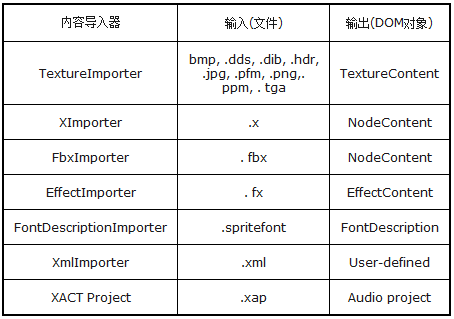
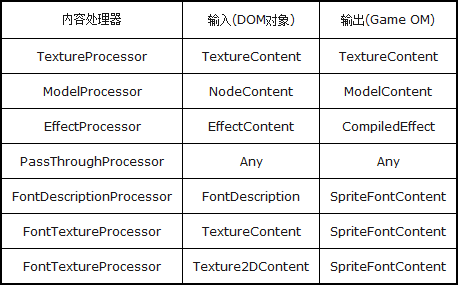
关于自定义Content Pipeline, 官方的介绍最为简介明了https://msdn.microsoft.com/en-us/library/ff433775.aspx
摘录如下:
自定义Content Pipeline有如下几种情形:
1. Supporting a New File Format
In this example, a nonstandard file format contains information that can be represented by a standard Content DOM type.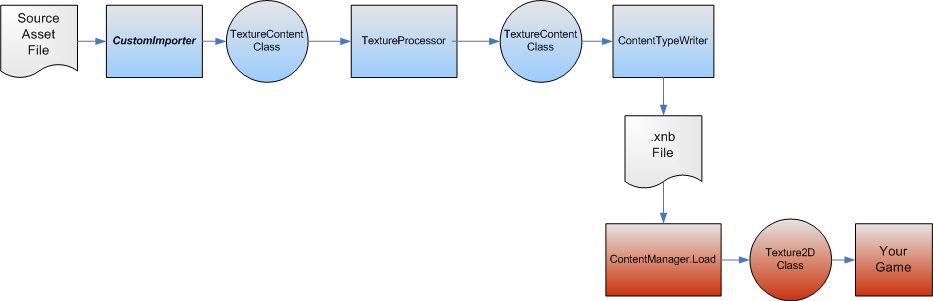
As illustrated, only a custom importer that can read the nonstandard file format and output a Content DOM object (in this case, a TextureContent object) is required. The remainder of the Content Pipeline process can be performed by a standard content processor and content loader.
只需要增加一个自定义的Importer.
官方样例:ObjImpoter(http://xbox.create.msdn.com/en-us/education/catalog/sample/custom_model_importer)
ObjImporter.cs的Import方法1
2
3
4
5
6
7
8
9
10
11
12
13
14
15
16
17
18
19
20
21
22
23
24
25
26
27
28
29
30
31
32
33
34
35
36
37
38
39
40
41
42
43
44
45
46
47
48
49
50
51
52
53
54
55
56
57
58
59
60
61
62
63
64
65/// <summary>
/// The importer's entry point.
/// Called by the framework when importing a game asset.
/// </summary>
/// <param name="filename">Name of a game asset file.</param>
/// <param name="context">
/// Contains information for importing a game asset, such as a logger interface.
/// </param>
/// <returns>Resulting game asset.</returns>
public override NodeContent Import(string filename,
ContentImporterContext context)
{
// Uncomment the following line to debug:
//System.Diagnostics.Debugger.Launch();
// Store the context for use in other methods
importerContext = context;
// Reset all importer state
// See field declarations for more information
rootNode = new NodeContent();
positions = new List<Vector3>();
texCoords = new List<Vector2>();
normals = new List<Vector3>();
meshBuilder = null;
// StartMesh sets positionMap, textureCoordinateDataIndex, normalDataIndex
materials = new Dictionary<string, MaterialContent>();
// ImportMaterials resets materialContent
// Model identity is tied to the file it is loaded from
rootNode.Identity = new ContentIdentity(filename);
try
{
// Loop over each tokenized line of the OBJ file
foreach (String[] lineTokens in
GetLineTokens(filename, rootNode.Identity))
{
ParseObjLine(lineTokens);
}
// If the file did not provide a model name (through an 'o' line),
// then use the file name as a default
if (rootNode.Name == null)
rootNode.Name = Path.GetFileNameWithoutExtension(filename);
// Finish the last mesh
FinishMesh();
// Done with entire model!
return rootNode;
}
catch (InvalidContentException)
{
// InvalidContentExceptions do not need further processing
throw;
}
catch (Exception e)
{
// Wrap exception with content identity (includes line number)
throw new InvalidContentException(
"Unable to parse obj file. Exception:\n" + e.Message,
rootNode.Identity, e);
}
}
2.Creating Special-Purpose Data from Standard Objects
For this example, a texture object that represents a map of normalized vectors derived from the original texture object is created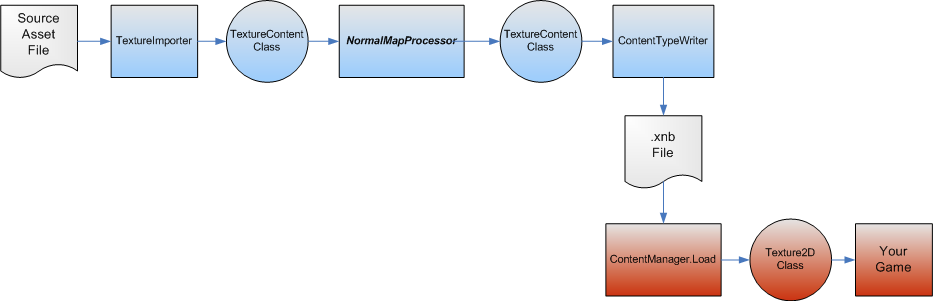
Since the texture is contained in a standard format for the game asset, a standard importer can be used to create the TextureContent object. A custom content processor (NormalMapProcessor) creates the special-purpose data, but uses the standard TextureContent class to contain the result so that it can be loaded by the standard content loader.
就是上一篇笔记中的扩展.
官方样例: Normal Mapping
(http://xbox.create.msdn.com/en-us/education/catalog/sample/normal_mapping)
1 | /// <summary> |
1 | /// <summary> |
NormalMappingModelProcessor内部引用了NormalMappingMaterialProcessor, 后者内部又引用NormalMapTextureProcessor. 这种依赖关系可以参见下图: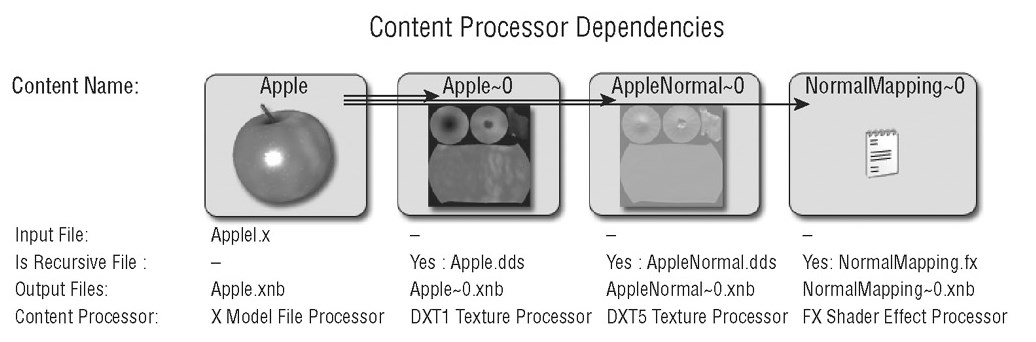
3.Supporting Custom Data from a Nonstandard Game Asset
Illustrated in this example is a nonstandard game asset file containing data that does not correspond to any standard data types.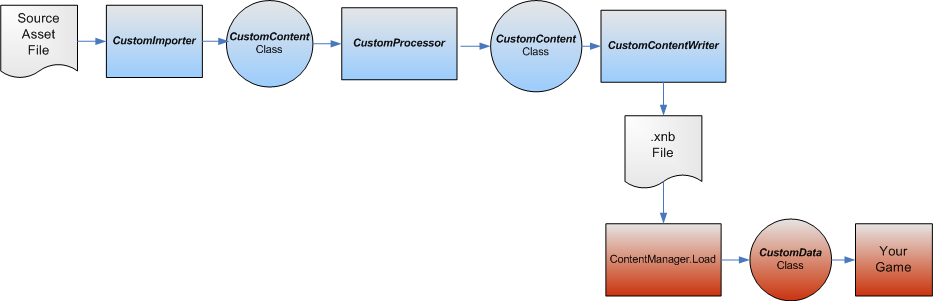
To read the nonstandard game asset file, a custom importer is required that outputs a CustomContent object. Since the output of the importer is a custom class, a custom content processor also is needed, and the ContentManager.Load method must be extended to support the custom data object.
这个相对比较复杂一些.
官方样例: Creating a Custom Importer and Processor (https://msdn.microsoft.com/en-us/library/bb447754.aspx)
The goal of the example in this tutorial is to import a pixel shader (in a file with the .psh extension), and to produce compiled effect data that can be assigned to an instance of Effect.
这里就不贴代码了.